How we built end-to-end encryption in a file transfer service
Like many companies, we work with privacy sensitive data like contracts, lists with email addresses and design documents. We were getting increasingly aware of the risks when sending privacy sensitive data via email: it is insecure and the GDPR regulations state that you need to take proper security measures when you work with privacy sensitive information. We started to look into alternatives and found out there are quite some ways of sending a document in a secure way. But they all have downsides for us: either your client needs to have an account for some kind of portal (our clients don't want to have another account), or you put the responsibility in the hands of your client. We thought there had to be an easier way to do this. What if you could create a request for files and send your clients a link to a nice branded page where they can easily upload their files?
Based on this thought we started to lay out the requirements: super simple for our clients and top notch security with end-to-end encryption. In this article we'll explain why we implemented SafeRequest the way we did.
Requesting files
The basic idea of SafeRequest is that you request the files you need, providing a nice and easy solution for your client. This has a huge security advantage: because you request the files ('pull') instead of someone sending them ('push'), you are sure the files arrive at the right person. There is no special link that gives you access to everything. Sending emails to the wrong recipient is one of the most common ways of data leaks.
End-to-end encryption
One of the security requirements was to have end-to-end encryption. So what is its advantage? End-to-end encryption means data is encrypted before it leaves the sender's device and only gets decrypted when it reaches the recipient's device. When it is sent over the internet or is stored on a server, it is always encrypted. Another key feature of end-to-end encryption is that the data's decryption key is only present at the recipient's device. This way, it is only possible to decrypt data when it is on the recipient's device.
Services like Signal or WhatsApp use end-to-end encryption as well.
SafeRequest's implementation
Here it gets a bit technical: we will dive into the implementation of end-to-end encryption in SafeRequest.
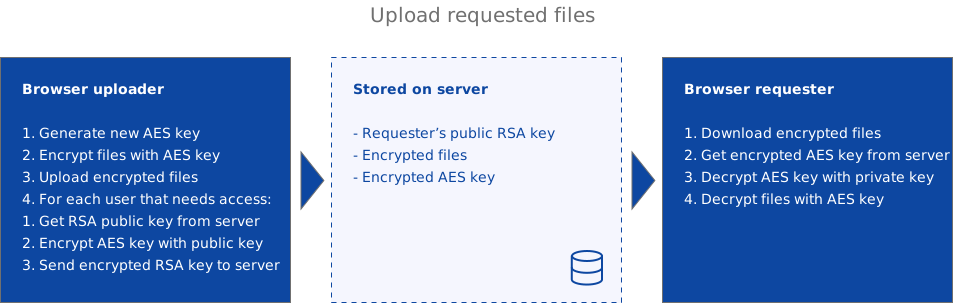
All the encryption and decryption of files happens locally in the browser, so all data uploaded to and downloaded from our servers is encrypted. We never have access to unencrypted files, or keys to decrypt files. When the requestee starts to upload, the encryption journey starts. SafeRequest uses 256-bits AES encryption with a randomly generated key to encrypt your files, and 4096-bits RSA-OAEP encryption to encrypt the AES-key. This way only you can decrypt the AES-key, meaning only you can decrypt the files. In the figure below you can find the steps taken when you upload a file using SafeRequest.
RSA
RSA is an asymmetric encryption algorithm which uses a key pair consisting of a private key and a public key. Information encrypted with the public key can only be decrypted with the private key, and the other way around. RSA is not used to encrypt the files itself, because it is not suitable for encrypting large amounts of data.
AES
AES is a symmetrical encryption algorithm which uses just one key for encryption and decryption. AES is suitable for encrypting large amounts of data, and is therefore being used to encrypt your files.
Team requests
We also offer team requests. This is very useful when you work in a small team that needs access to your customers data. In this case, you specify in advance which persons need access to the uploaded data. Once a file is uploaded, the generated AES key is encrypted with the public keys of all the users that need access. This way exactly those people will be able to decrypt the AES key with their own private keys.
When a user uploads their files, we clearly show whether it is a team request or not and which users will have access to the files.
Sending files
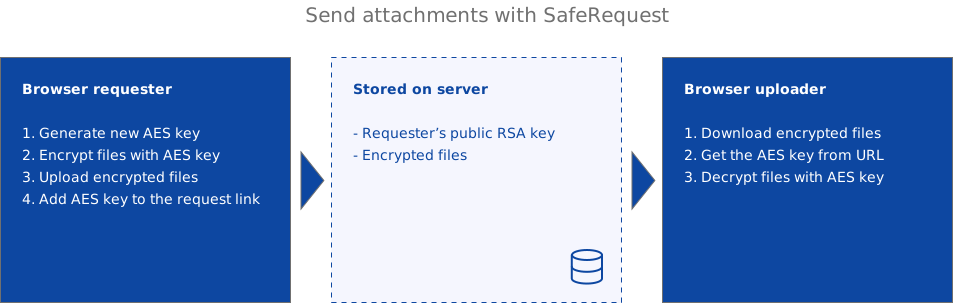
With SafeRequest you can also send files. You can add them as an attachment when sending a request. The requestee doesn't have an account, so he doesn't have an RSA keypair. Therefore we send the AES key in the URL. This works in essence the same as how services like Firefox Send work. It's important to understand that this is less safe than the process of requesting files: everyone with the link can access the attached files.
It is now your own responsibility to send this link in a secure way. Sending the link via e-mail undermines the end-to-end encryption concept, so you better share the link via an end-to-end encrypted platform like Signal or WhatsApp.
Generation of the RSA key pair
We've talked about the RSA key pair and how the private key only exists on the users device. How does this work? When you create a new SafeRequest account, we generate a new RSA key pair in the user's browser during onboarding. The public key is stored on the server, where it can be used for encryption, the private key is kept with the user for decryption. This private key is never sent over the internet.
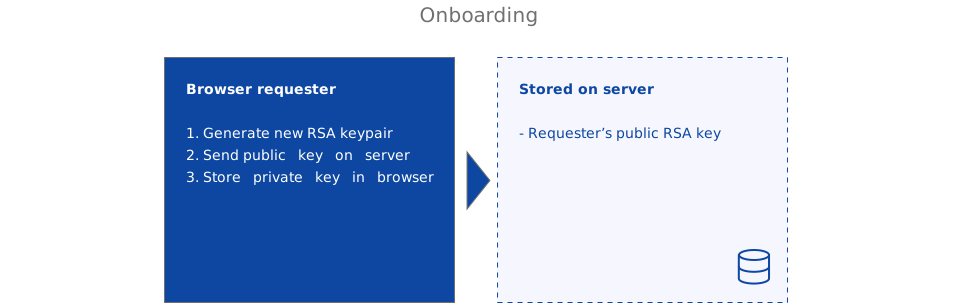
You can always generate a new key pair, but then you'll lose access to files that are already uploaded.
How is this private key stored?
We store the private key in the browser of the user. We also offer an option to download it for backup purposes. We know storing a private key in the browser is a slightly controversial decision. There are claims this isn't safer than storing the private key on the server: if a hacker is able to inject Javascript in your application, he or she can collect the private key form the storage and send it to the server. We acknowledge this, however there are proper ways to secure this:
- We disable the execution of inline Javascript, which prevents Javascript injection;
- We explicitly whitelist sources by setting headers, so none can load Javascript from other sources.
With these security measures in place, we believe it is still saver than storing the private key on the server giving the user more control over their own key.
Three factor security
This article focused on the encryption of SafeRequest. But there are actually three factors that protect your files.
1. Your account
No one can download the files without having access to your account. You need to be logged in with your email address and password to be able to download your files.
2. 2FA
You can setup Two Factor Authentication, which means you need a 2FA app on your phone to verify your identity.
3. Your private key
Even if someone gets access to your account and is able to download files, only you have access to your private key because it is stored locally. So only you will be able to decrypt the files.
Open source
We have open sourced our Javascript encryption libraries. They can be found on GitHub: https://github.com/woosttech/saferequest-encryption. We love to hear your feedback, also feel free to make improvements.